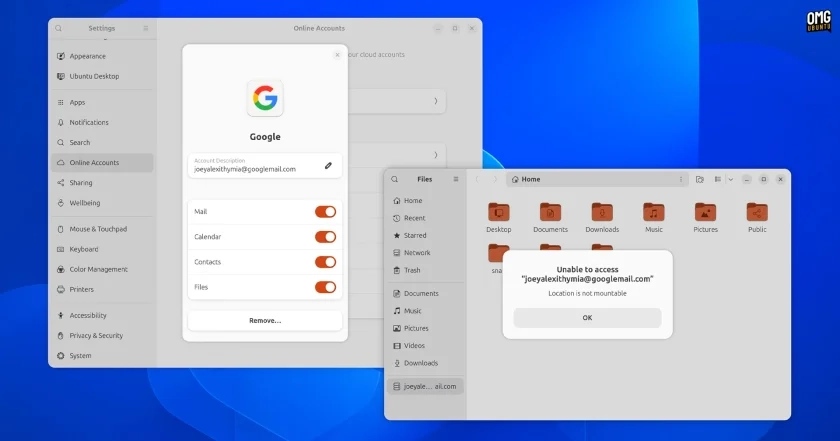
If you’re accustomed to accessing Google Drive through the Nautilus file manager, a recent update in GNOME 50 may come as a surprise. This version, which is integrated into the upcoming Ubuntu 26.04 LTS, has officially removed support for accessing Google Drive files.
Previously, GNOME Online Accounts (GOA) allowed users to log in to their Google accounts, facilitating access to contacts, mail, and calendar data. However, the option to mount Google Drive was dependent on a toggle that has now disappeared. Users attempting to access Google Drive in Nautilus will encounter an error stating “Unable to access…” despite still seeing a Files toggle in the GOA settings.
The removal of this feature stems from ongoing issues surrounding its maintenance. The Google Drive access in GNOME relies on a library known as libgdata, which has been without a maintainer for nearly four years. GNOME developer Emmanuele Bassi confirmed that the feature is “no longer supported” and highlighted that a call for volunteers to maintain libgdata fell on deaf ears. Consequently, the virtual filesystem layer, GVFS—essential for GNOME applications to interact with remote storage—has stopped depending on it due to its unmaintained status and associated security vulnerabilities.
While the capability to integrate Google Drive remains operational in older versions of GNOME and Ubuntu, such as Ubuntu 24.04 LTS, users moving to Ubuntu 26.04 LTS should be wary of this significant change. Currently, there are no official replacements for this integration, and the alternative option for accessing Google Drive is to use rclone, which allows mounting Google Drive as a local filesystem. However, this approach necessitates initial setup apart from GOA.
This absence of Google Drive support reflects a broader shift in GNOME’s development priorities and signifies a challenge for Linux users reliant on Google Drive integration.