Brighten Your Desktop: Introducing Eye-Catching Weather Extensions for GNOME Shell
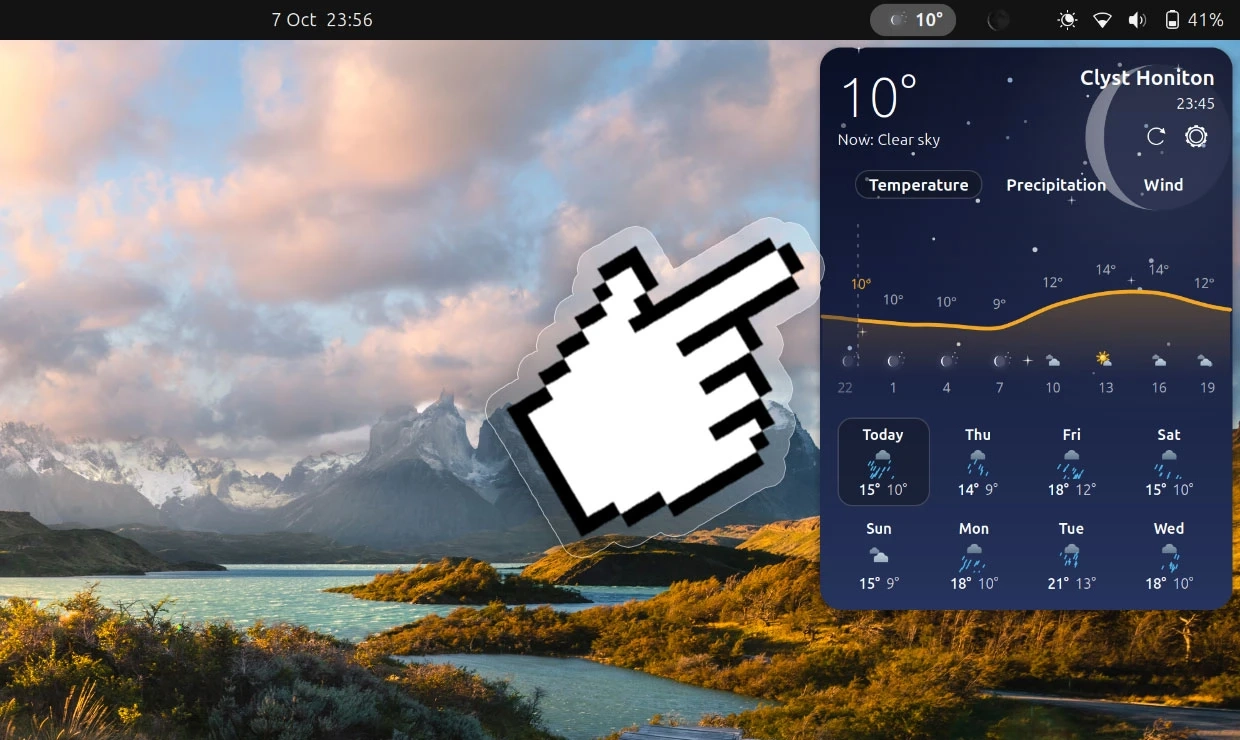
Recently, a variety of new weather extensions for GNOME Shell have emerged, with Weatherglass and Weather Prime leading the way in terms of functionality and visual appeal.
Weatherglass: A Dynamic Experience
Weatherglass stands out due to its eye-catching animations. It not only displays current temperatures but also uses animated icons to illustrate weather conditions. A simple click reveals a forecast card with animated backdrops outlining current conditions, hourly forecasts, and an 8-day outlook, including graphs for temperature, precipitation, and wind speed. Users can choose between metric and imperial systems for measurements, though they cannot mix units (e.g., mph for wind speed and Celsius for temperature). The extension supports multiple weather backends, including Open-Meteo, Met.no, and NOAA NWS, and features automatic location detection.
However, Weatherglass has been criticized for its high resource usage, causing increased CPU and GPU load even when not actively in use. Users can try it out on GNOME Extensions as long as they are using GNOME 50 or later.
Weather Prime: A Compact Weather Station
Weather Prime presents itself as a "full-featured weather station" that provides vital weather data in a compact panel applet. Users can see current conditions at a glance, and by clicking on the applet, a dropdown reveals a wealth of forecast data displayed in a visually appealing format—featuring graphs and colorful graphics rather than the typical dense tables seen in other extensions.
Despite its aesthetic appeal, users may find that the data isn’t as detailed or accurate as they hoped, possibly depending on their location or backend issues. Notably, it does not include live radar maps or astrological details, which might be a letdown for some users. Unlike Weatherglass, Weather Prime does not require API keys for its main weather data source, Open-Meteo, making it simpler to set up. However, it also allows users to integrate WeatherAPI.com with a key, though it may not always function as expected.
Developers interested in Weather Prime can access it both on GNOME Extensions and its GitHub page, although recent inactivity on the GitHub repository raises concerns about future updates.
In conclusion, both Weatherglass and Weather Prime offer unique takes on weather applets for GNOME Shell. With their appealing visuals and diverse features, they can enhance the desktop experience for users looking to stay informed about the weather.